
Introduction
My 1-year old loves putting our TV remotes in the most random places. After not finding one of the remotes for a few days, I decided I needed a way to control my TV from my phone. I knew that Roku has an official app to do this, but when I checked the app store for my Samsung TV, only apps from dubiously named companies were available. This inspired me to create Samsung Web Remote. It’s a .NET web application that allows you to control Samsung TVs in your local network via your web browser. The project consists of three main components:
- SamsungWebRemote.Lib - A reusable library containing the core logic for connecting to TVs and sending commands
- SamsungWebRemote.Console - A command-line client demonstrating how to use the library
- SamsungWebRemote.Web - A web API that provides a REST interface for controlling TVs
This post will focus on the backend architecture, particularly how the library handles WebSocket connections and command transmission.
The Library Architecture
The core of the project is the SamsungRemote class in SamsungWebRemote.Lib, which abstracts away all the complexity of communicating with Samsung TVs. This library is designed to be reusable and can be shared across multiple clients - currently used by both the Console and Web implementations.
Establishing a connection
Connecting to the TV is done via WebSocket. The URL looks like this:
{ws/wss}://{ipAddress}:{port}/api/v2/channels/samsung.remote.control?name={base64AppName}&token={token?}The query parameters include:
name: Base64-encoded application name (e.g., “SamsungWebRemote”). This will be displayed on TV when it asks for permission and when the device is stored in TV’s connected devices list.port: 8002 for secure WebSocket, 8001 for unencrypted WebSocket. Newer TVs require secure.token: An optional authentication token. If included, the user won’t have to give permission on the TV again.
When connecting, the library receives an initial ms.channel.connect event from the TV, which includes a session token. This token is required for subsequent command transmissions and is cached for future use.
Command Structure
Commands sent to the TV follow a specific JSON structure:
{
  "Method": "ms.remote.control",
  "Params": {
    "Cmd": "Click",
    "DataOfCmd": "KEY_POWER",
    "Option": "false",
    "TypeOfRemote": "SendRemoteKey"
  }
}
The Method is fixed to ms.remote.control, while the Params object contains:
Cmd: Always set to"Click"DataOfCmd: The key to press (e.g.,"KEY_POWER","KEY_VOLUMEUP")Option: Always set to"false"TypeOfRemote: Always set to"SendRemoteKey"
The library provides convenience methods for common actions like power, volume control, navigation, etc.
public async Task Press(string key)
{
    if (_webSocket.State != WebSocketState.Open)
    {
        await Connect();
    }

    var command = new Command
    {
        Params = new Parameters
        {
            DataOfCmd = key
        }
    };
    await _webSocket.SendAsJsonAsync(command, logger);
    await Task.Delay(100);
}

public async Task VolumeUp() => await Press("KEY_VOLUP");
public async Task Power() => await Press("KEY_POWER");
public async Task Home() => await Press("KEY_HOME");
I had to add a small delay here because I noticed that sending too many commands at once could result in glitchy behavior.
WebSocket Extensions
I was surprised by how verbose the WebSocket API is in .NET compared to event-based APIs like JavaScript’s native WebSockets or the old websocket-sharp in .NET Franmework. I ended up writing a few extension methods to reduce the amount of code and improve readability.
internal static async Task<T?> ReceiveJsonAsync<T>(
    this WebSocket webSocket,
    ILogger? logger = null)
{
    var jsonString = await webSocket.ReceiveStringAsync(logger);
    if (string.IsNullOrWhiteSpace(jsonString))
    {
        return default;
    }
    return JsonSerializer.Deserialize<T>(jsonString, JsonSerializerOptions.Web);
}

internal static ValueTask SendAsJsonAsync<T>(
    this WebSocket webSocket,
    T message,
    ILogger? logger = null)
{
    var messageString = JsonSerializer.Serialize(message, JsonSerializerOptions);
    var bytes = Encoding.UTF8.GetBytes(messageString).AsMemory();
    return webSocket.SendAsync(
        bytes,
        WebSocketMessageType.Text,
        endOfMessage: true,
        cancellationToken: CancellationToken.None
    );
}
The Web Client
For the web client, I mostly vibe coded the UI using local LLM. It ended up looking pretty detect on the first pass, so I didn’t mess with it too much. It supports switching between multiple TVs, and stores preferences in local storage so that each user can keep their own settings.
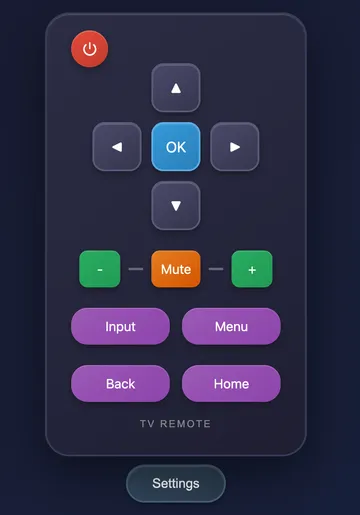
I added a singleton class to cache WebSockets for each TV. This improves performance significantly since connecting a WebSocket to the TV can take a few seconds. Once the socket is connected, feedback is pretty much immediate.
public class TvRemoteManager(ILogger<TvRemoteManager> logger, IServiceScopeFactory scopeFactory) : IAsyncDisposable
{
    private readonly Dictionary<int, SamsungRemote> _remotes = [];
    private readonly ConcurrentDictionary<int, SemaphoreSlim> _locks = [];

    public async Task<SamsungRemote?> GetInstance(int id)
    {
        // ... retrieve TV from database ...

        var tvLock = _locks.GetOrAdd(tv.Id, _ => new SemaphoreSlim(1, 1));
        await tvLock.WaitAsync();
        try
        {
            if (_remotes.TryGetValue(tv.Id, out var cached))
            {
                return cached;
            }

            var settings = new ConnectionSettings
            {
                AppName = "Samsung Web Remote",
                IpAddress = tv.IpAddress,
                Port = 8002,
                Token = tv.Token
            };

            var remote = new SamsungRemote(settings, logger);
            var result = await remote.Connect();

            if (tv.Token == null)
            {
                tv.Token = result.Token;
                await db.SaveChangesAsync();
            }

            _remotes[tv.Id] = remote;
            return remote;
        }
        finally
        {
            tvLock.Release();
        }
    }
}
The TvRemoteController provides REST endpoints for each command. It also has some locking so that only one command is sent to the same TV at a time. This avoids some glitchy behavior
I observed when sending too many commands to the TV at once.
[ApiController]
[Route("api/tv/{id:int}/remote")]
public class TvRemoteController(TvRemoteManager tvRemoteManager)
{
    [HttpGet]
    public async Task<IResult> Get([FromRoute]int id, [FromQuery]string command)
    {
        var remote = await tvRemoteManager.GetInstance(id);
        if (remote == null)
        {
            return Results.NotFound();
        }
        var tvLock = Locks.GetOrAdd(id, _ => new SemaphoreSlim(1, 1));
        if (!await tvLock.WaitAsync(0))
        {
            return Results.StatusCode(429);
        }
        try
        {
            if (command == "volume_up")
            {
                await remote.VolumeUp();
            }
            // ... more command mappings ...
            return Results.Ok();
        }
        finally
        {
            tvLock.Release();
        }
    }
}
Conclusion
I’m pretty happy with how this project came out. The server’s running on a Raspberry Pi and the application hasn’t failed yet. In the future, I’d like to see how difficult it is to add support for different types of TVs. Another interesting idea is to add some configurability to the remote. For example, some people might need the Channel Up/Down buttons if they’re still watching over-the-air channels. Or what if you could rearrange the buttons to whatever layout you prefer? That would be cool.